
Small businesses are frequent targets for cyberattacks due to perceived vulnerabilities. Effective protection does not require large budgets or specialized technical teams. Instead, security relies on establishing consistent habits and utilizing accessible tools to safeguard digital assets and customer data against common threats.
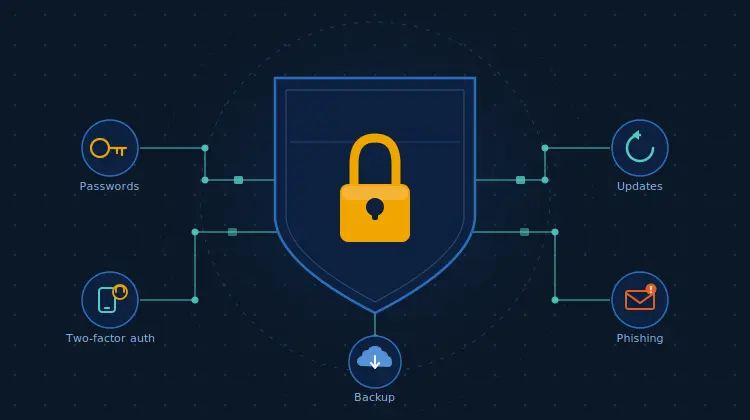
Key strategies include implementing password managers and two-factor authentication to secure accounts. Promptly installing software updates addresses known vulnerabilities, while employee training helps identify phishing attempts. Additionally, maintaining regular data backups ensures business continuity and protects against ransomware attacks by allowing for quick system restoration.
Most small business owners don’t think about cybersecurity until something goes wrong. Then it’s too late. Imagine arriving at your shop one morning to find the locks changed, a stranger behind the counter, and your customer records spread across the floor.
Now imagine the same thing happening overnight – silently, while you slept – to your computer systems.
That’s a cyberattack. And before you click away thinking it won’t happen to you, know this: small businesses are the preferred target, not the overlooked ones. Cybercriminals go for them precisely because owners assume they’re not worth the bother.
5 Essential Small Business Cybersecurity Tips
The good news is that the most effective small business cybersecurity tips don’t require a computer science degree, a dedicated IT team, or an enterprise budget. They require a few habits you probably aren’t doing yet.
1. Stop reusing passwords
If your password is your business name with an exclamation mark at the end, we need to talk.
Hackers use automated tools that can crack simple passwords in seconds. More importantly, if you’re using the same password across your email, your bank, and your invoicing software, a single breach anywhere brings down everything. One door opens all the rooms.
The fix is a password manager. It stores every password in an encrypted vault so you only ever need to remember one. It also generates random strings like below: xK9#mP2!vL
So you never have to think one up yourself. Bitwarden is free and genuinely excellent. 1Password is worth paying for if you want something more polished.
This week: sign up for one and spend 30 minutes moving your most important accounts over. That’s it.
2. Turn on two-factor authentication
Starting with your email first. Even if someone gets hold of your password, two-factor authentication (2FA) stops them logging in without a second check – usually a code sent to your phone. One extra step for you, a wall for everyone else.
Start with email, not your bank. Almost every account you own uses your email address to reset passwords. Lose access to your inbox, and you’ve potentially handed over everything else with it.
Go to your email settings and search for “two-step verification.” Turn it on. Five minutes, and it’s probably the single most useful thing on this list.
3. Install updates when they appear
Everyone clicks “remind me later.” Forty-seven times. Updates feel like interruptions, so they get ignored.
Here’s what that notification is actually saying: we found a hole in our software that hackers can walk straight through – this update closes it. Ignoring it is like being told your shop window is smashed and deciding to deal with it next week.
Outdated software is full of known vulnerabilities. Hackers don’t need to be clever; they just need to find a business that hasn’t clicked install. Enable automatic updates on every device you own, then set a monthly reminder to manually check anything that doesn’t update itself.
4. Teach your team to spot a phishing email
One of the most practical small business cybersecurity tips is also the most overlooked: train the humans. Your most careful, competent employee can hand over the keys to your business with one wrong click. That’s not carelessness – phishing emails are genuinely convincing now.
Phishing is the number one way hackers get into business systems. Fake emails impersonating your bank, a supplier, or even your own CEO, designed to trick someone into clicking a link or handing over their login details.
Give your team a simple test before acting on any unexpected email:
- Does it create urgency or threaten consequences? (“Your account closes in 24 hours.”) Red flag.
- Does the sender’s address look slightly off?
[email protected]This is not a email from Amazon. - Are there spelling mistakes or odd formatting? Real companies proofread.
- Were you expecting this email at all? If not, call the sender before clicking anything.
This week: search for a phishing email example and walk your team through it. Fifteen minutes. Could save you a very expensive afternoon.
5. Back up your data
Ransomware is exactly what it sounds like. A criminal encrypts all your business files – invoices, contracts, customer records – and demands money to give them back. It happens to small businesses every single day, and the businesses that recover quickly all have one thing in common: they had backups.
A backup means you can restore from a clean copy and get back to work without paying anyone anything.
The 3-2-1 rule keeps it simple: three copies of your data, on two different types of storage, with one copy offsite or in the cloud. Backblaze automates the whole thing for a few pounds a month. If you’re already on Google Workspace or Microsoft 365, check that auto-backup is actually switched on – a lot of people assume it is and it isn’t.
Start somewhere with your small business cybersecurity
These Small Business Cybersecurity Tips isn’t about being paranoid. It’s about being prepared – the same reason you lock up at night or keep a fire extinguisher behind the counter.
You don’t have to do all of this today. Pick one thing from this list and do it now. Come back next week and do another. A month from now, you’ll be in substantially better shape, and you won’t have written a line of code to get there.
Conclusion
Protecting your small business from cyber threats isn’t an insurmountable task reserved for tech giants. By implementing these five practical and accessible tips – using password managers, enabling two-factor authentication, installing updates, training your team against phishing, and backing up your data – you can significantly bolster your defenses. Start small, be consistent, and build a robust cybersecurity posture that safeguards your business, your data, and your peace of mind. The time to act is now, before an attack forces your hand.
Frequently Asked Questions (FAQ)
Q: Why are small businesses targeted by cyberattacks?
A: Small businesses are often seen as easier targets by cybercriminals because they may have fewer security measures in place compared to larger corporations. Many owners mistakenly believe they are not “worth the bother,” making them vulnerable.
Q: Do I need an IT team to implement these cybersecurity tips?
A: No, the good news is that these essential cybersecurity tips are designed to be implemented without a dedicated IT team or a large budget. They focus on establishing simple habits and using accessible tools.
Q: What is a password manager and why do I need one?
A: A password manager is a tool that stores all your passwords in an encrypted vault, so you only need to remember one master password. It also generates strong, unique passwords for each of your accounts, preventing a single breach from compromising all your online services.
Q: How does two-factor authentication (2FA) protect my accounts?
A: Two-factor authentication adds an extra layer of security by requiring a second form of verification (like a code sent to your phone) in addition to your password. Even if a hacker gets your password, they can’t log in without this second factor.
Q: What is phishing and how can I protect my business from it?
A: Phishing is a type of cyberattack where criminals send fake emails (impersonating banks, suppliers, or even your CEO) to trick recipients into clicking malicious links or revealing login details. Protecting your business involves training your team to recognize red flags like urgency, suspicious sender addresses, spelling errors, and unexpected requests.
Q: Why is data backup so important for small businesses?
A: Data backup is crucial because it protects your business from data loss due to cyberattacks (like ransomware), hardware failure, or accidental deletion. With regular backups, you can restore your files and operations quickly without having to pay a ransom or suffer significant downtime.
